
TimeTree - Shared Calendar
Visual Data
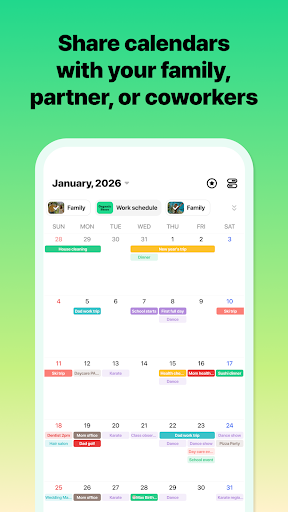
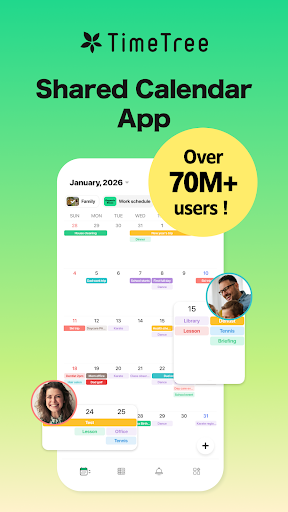
Briefing
TimeTree - Shared Calendar is a versatile mobile app designed to help users organize their schedules and collaborate seamlessly. Available as an Android app and on iOS devices, it offers a simple yet powerful app experience for managing multiple calendars in one place. Whether for personal or team use, this app provides an intuitive platform to keep everyone on the same page.
Core Data
Core Features
- Intuitive calendar interface that allows easy scheduling and event management for all users.
- Real-time synchronization across devices ensures everyone stays updated instantly.
- Shared calendar features enable multiple users to collaborate seamlessly within groups or families.
- Supports offline mode, so you can view and edit your schedules without an internet connection.
- Color-coded events and reminders help organize your day visually for better planning.
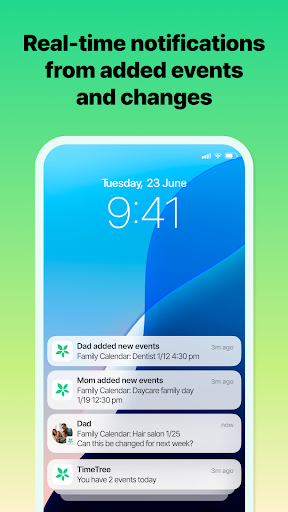
- Notifications keep you alert about upcoming deadlines or appointments, enhancing your app experience.
Who This App Is For
This mobile app is ideal for busy individuals, families, and small teams seeking a straightforward yet powerful scheduling solution.
It suits those who want an app-based calendar that simplifies group planning, manages personal events, and offers a smooth app experience on Android devices and other platforms.
Why Choose This App
This app provides a reliable app-based solution with useful app features like real-time sync and shared calendars, making coordination effortless.
Its user-friendly interface and offline capabilities set it apart, delivering an excellent experience for anyone looking for an efficient and trustworthy Android app or launcher app for productivity.
System Features
Effortless schedule sharing for group coordination
Unified scheduling with calendar synchronization
Easy event creation and management tools
Instant notifications for important updates
Visual event organization with color coding
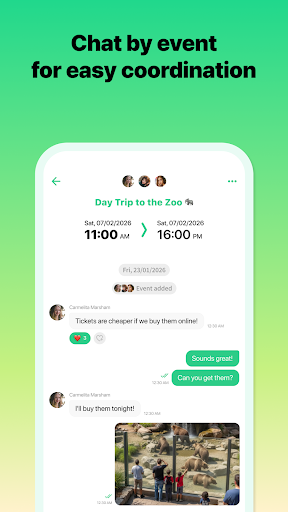
Seamless communication within events
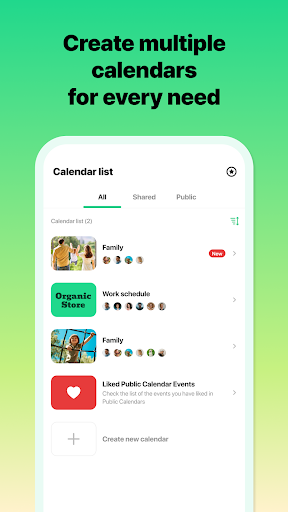
Multiple calendars for better organization
Quick access via home screen widgets
Advantages
- +Users can easily navigate and set up shared calendars without a steep learning curve.
- +Updates are instantly reflected across all devices, ensuring everyone stays on the same page.
- +Allows seamless sharing and editing of calendars by several users simultaneously.
- +Automatic alerts help users stay punctual and avoid missing important activities.
- +Works smoothly on iOS, Android, and web browsers, covering a wide user base.
Limitations
- -Customization of calendar themes or event labels is somewhat restricted, which may impact personalization.
- -In some cases, updates may take a few minutes to sync across devices, especially with unstable internet.
- -Advanced features require a subscription, which might be a barrier for casual users.
- -Users seeking to combine calendars with task lists need third-party integrations or separate apps; future updates could address this.
- -Offline functionality is minimal, which could inconvenience users without reliable internet; offline mode might be improved in future updates.
Download Protocol
[SECURE LINK] You are being redirected to the official app store.
FAQ Protocol
Q: How do I log into the TimeTree - Shared Calendar app?
To access the app features of TimeTree, you'll need to create an account or log in with an existing one. This helps you sync your schedules across devices and ensures your data stays safe.
Once logged in, you can easily manage your shared calendars and invite others. The app experience is straightforward, making it simple to stay organized whether you're using the Android app or iOS version.
Q: Is the TimeTree app safe to use on my device?
Yes, TimeTree is a trusted app based solution, developed by a reputable team focused on user privacy and data security. The app complies with standard safety protocols to protect your information.
Whether you're using it as a launcher app or for simple calendar sharing, you can rely on its security features. The app experience prioritizes your privacy while offering useful productivity tools.
Q: What are the main app features of TimeTree?
TimeTree offers a variety of app features designed to make scheduling easier, such as shared calendars, event reminders, and color-coded entries. It helps keep everyone on the same page in personal or team settings.
This productivity app supports real-time updates and notifications, making it a reliable app based solution for managing your day-to-day plans. Its user-friendly interface is a big plus for a seamless app experience.
Q: Can I use TimeTree on my Android app and iPhone?
Absolutely. TimeTree is available on both Android and iOS devices, providing a consistent app experience across platforms. Whether you prefer the Google Play Store or the Apple App Store, you can access its features easily.
This cross-platform compatibility ensures you can stay organized no matter which device you use, making it a great choice for shared calendar management and productivity improvements.
Q: How do I troubleshoot syncing issues in TimeTree?
If your shared calendars aren't syncing properly, first check your internet connection and ensure you're logged into the same account on all devices. Restarting the app can often resolve minor glitches.
For persistent problems, updating to the latest version of the Android app or iOS version is recommended. The app's support resources provide additional guidance to ensure a smooth app experience.
Q: Does TimeTree support multiple calendars and team collaboration?
Yes, TimeTree allows you to create multiple shared calendars, which is perfect for managing different areas of your life, like work, family, or hobbies. You can also invite friends or colleagues to collaborate.
This makes it an effective app based solution for team productivity, keeping everyone aligned and informed through a simple, intuitive interface.
Q: Is TimeTree free, and are there any premium features?
The core features of TimeTree are available for free, making it accessible to most users. It's a popular productivity app that offers essential tools for calendar sharing and reminders without cost.
Optional premium features may be available for additional customization or storage options, but the free app still provides a reliable app experience for everyday scheduling needs.
Q: What languages and regions does TimeTree support?
TimeTree supports multiple languages and is designed for users worldwide. It is especially popular in regions where shared calendar management is essential for daily planning.
Using the app as a launcher app or a straightforward scheduling tool, users from different regions can enjoy a seamless app experience tailored to their local language preferences.