
OBD Scanner ELM327: GaragePro
Visual Data

Briefing
Obd Scanner ELM327: GaragePro is a user-friendly auto diagnostic mobile app designed for car enthusiasts and professionals alike. This Android app offers comprehensive features to read and clear vehicle trouble codes, monitor real-time sensor data, and help maintain your vehicle's health, providing an intuitive app experience that simplifies auto repairs and diagnostics.
Core Data
Core Features
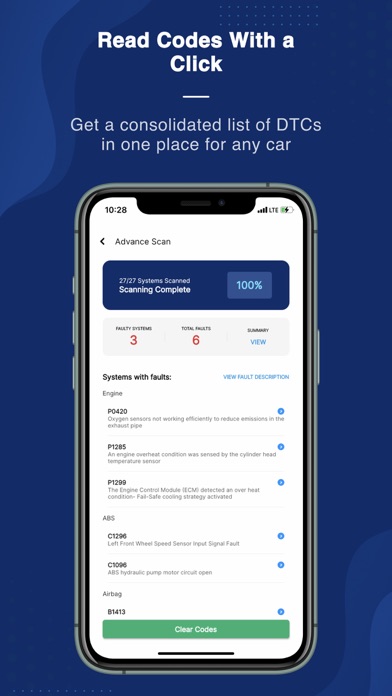
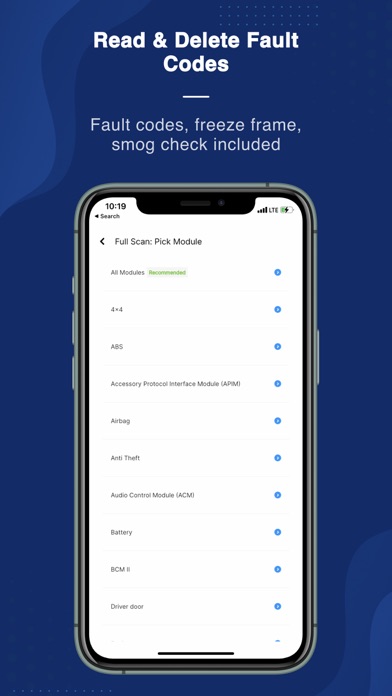
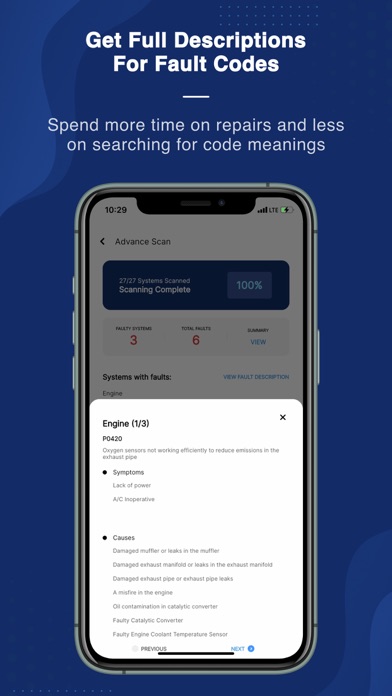
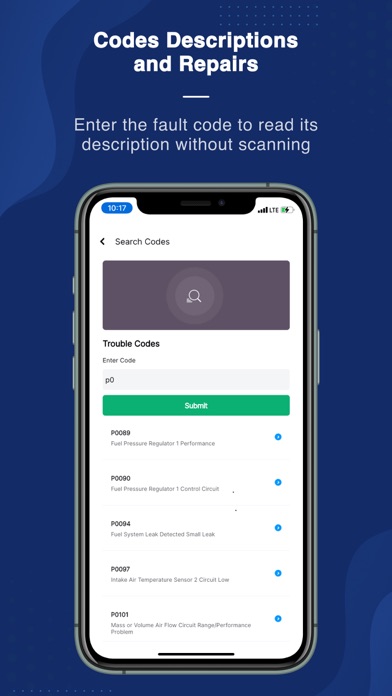
- The app features comprehensive diagnostics, allowing users to read and clear OBD error codes easily.
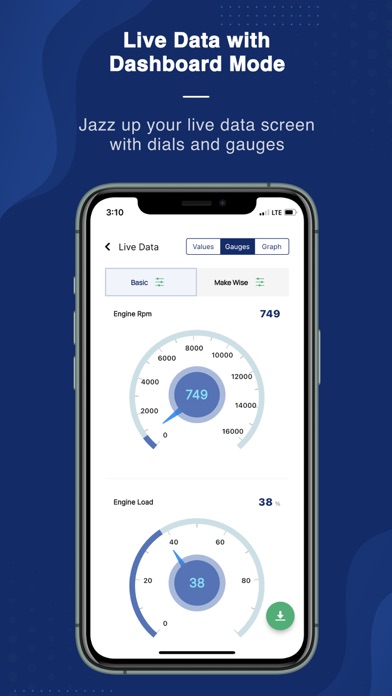
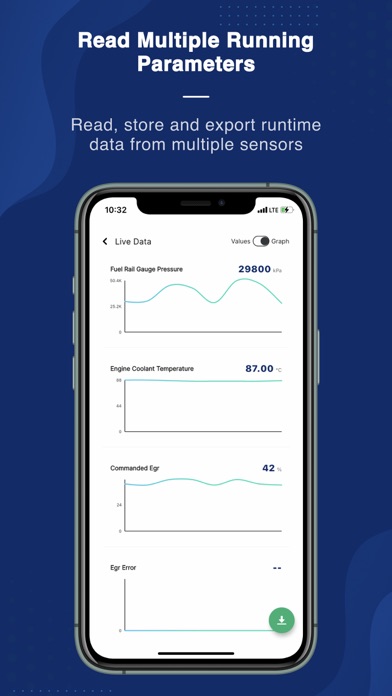
- Real-time data streaming provides instant insights into your vehicle's performance directly on the mobile app.
- Support for multiple protocols ensures broad compatibility with various car models using the OBD2 standard.
- The user-friendly interface makes navigation simple, even for those new to auto diagnostics or app-based solutions.
- Wireless connectivity via Bluetooth enables convenience without the hassle of cables during scans.
- Advanced graphing tools visualize sensor data for easy interpretation of vehicle health.
- Customizable alerts notify you about potential issues before they become major problems.
Who This App Is For
This mobile app is ideal for car owners, DIY enthusiasts, and auto repair professionals who want quick, reliable diagnostics on the go. Its user-friendly interface makes it accessible for both beginners and experienced users.
Whether you need to troubleshoot engine problems or monitor vehicle health regularly, this app-based solution offers convenient features for daily use, car maintenance, and professional diagnostics alike.
Why Choose This App
This Android app provides an efficient, accurate, and easy-to-use experience for vehicle diagnostics, setting it apart with reliable app features. Its seamless app experience ensures fast and precise analysis of vehicle issues.
Designed with user needs in mind, it solves common car troubleshooting challenges and offers a trustworthy, comprehensive auto diagnostics tool that stands out among other launcher apps in the auto & vehicle category.
System Features
Level 1: User-friendly vehicle diagnostics app
Level 2: Comprehensive coverage and wireless connectivity
Level 3:
- Read and clear vehicle trouble codes
- Monitor real-time sensor data
- View detailed vehicle information
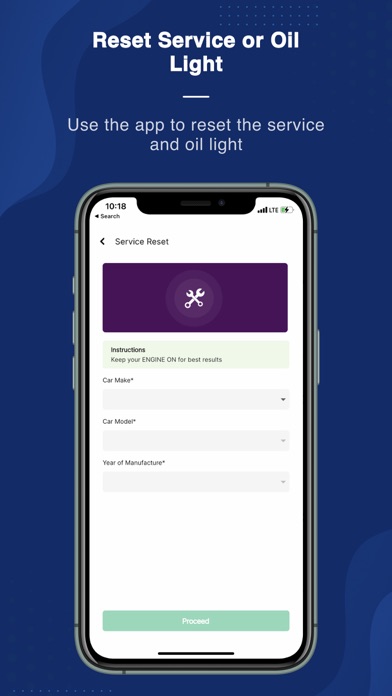
- Perform reset and special functions
Level 4:
- Generate shareable diagnostic reports
- Access advanced reset functions for complex issues
Advantages
- +The app features an intuitive layout that makes it easy for beginners to navigate and operate.
- +Supports a large range of OBD2-compliant vehicles, enhancing its versatility.
- +Provides live engine diagnostics and parameter readings for immediate insights.
- +Works seamlessly across various smartphones and tablets, increasing accessibility.
- +Able to read and clear fault codes, helping users troubleshoot issues effectively.
Limitations
- -Some users experience intermittent Bluetooth disconnections, which can disrupt diagnostics.
- -Lacks certain in-depth diagnostic tools found in professional software, which may limit detailed analysis.
- -The layout can be overwhelming for beginners, but future updates might optimize the design.
- -Some detailed reports and features require a premium upgrade; a workaround is to use core functions free of charge.
- -Requires internet connection for certain features, but basic diagnostics can be performed offline; official updates are expected to enhance offline support.
Download Protocol
[SECURE LINK] You are being redirected to the official app store.
FAQ Protocol
Q: How do I install the OBD Scanner ELM327: GaragePro app on my device?
Getting started with the OBD Scanner ELM327: GaragePro mobile app is straightforward. You can find the app in the Google Play Store for Android devices or the Apple App Store for iPhone users. Simply search for the app name and follow the installation instructions on your device.
This app is designed to work smoothly as an app-based solution for vehicle diagnostics. Once installed, you'll be able to connect your ELM327 scanner and access a variety of app features tailored to both casual users and automotive professionals.
Q: Is the OBD Scanner ELM327: GaragePro safe to use on my vehicle?
Yes, the OBD Scanner ELM327: GaragePro is designed with user safety and vehicle compatibility in mind. As an Android app compatible with most ELM327-based scanners, it provides a safe and reliable way to view diagnostic trouble codes and real-time data.
However, always ensure you're using a trusted scanner device and follow the app instructions carefully. This app offers an experience rooted in automotive expertise, making it a trusted tool for vehicle maintenance and diagnostics.
Q: What features does the GaragePro app offer for vehicle diagnostics?
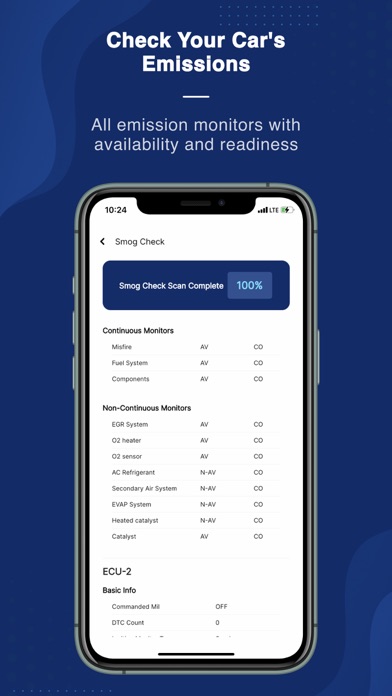
The GaragePro app features comprehensive capabilities that include reading and clearing diagnostic trouble codes, viewing live sensor data, and performing basic vehicle health checks. It's a powerful app-based solution that transforms your smartphone into a diagnostic tool.
The app offers an intuitive interface and advanced features suitable for both beginners and professional mechanics. As a launcher app for vehicle diagnostics, it makes vehicle troubleshooting straightforward and efficient, especially for Android app users.
Q: Can I use this mobile app with all types of vehicles?
The OBD Scanner ELM327: GaragePro is compatible with most vehicles manufactured after 1996 that support OBD2 protocols. The app works well with Android devices and is suitable for a wide range of car makes and models.
This app-based solution is designed to be user-friendly, providing essential diagnostic features regardless of your vehicle type. Always check if your vehicle's OBD port is compatible with ELM327 scanners to ensure a smooth experience.
Q: How reliable is the app experience when using GaragePro for vehicle diagnostics?
The app experience with GaragePro is highly reliable, especially for users seeking an accurate and real-time diagnosis. The app features are built on automotive expertise and are backed by a solid understanding of vehicle electronic systems.
Whether you're a DIY enthusiast or a professional, this Android app offers accurate data and dependable performance, making it a trusted tool in vehicle maintenance routines and troubleshooting tasks.
Q: Do I need any special technical knowledge to operate the GaragePro app?
Not at all. The GaragePro app is designed to be user-friendly, with a clear interface that makes vehicle diagnostics accessible to everyone. Basic knowledge of vehicle systems can help, but the app's features are intuitive enough for beginners.
Expertise comes from experience with vehicle diagnostics, but the app aims to make the entire process simple, providing helpful instructions and clear data visualization for all users.
Q: Is the GaragePro app regularly updated to improve performance and features?
Yes, the developers behind GaragePro regularly update the app to enhance stability, add new features, and ensure compatibility with the latest vehicle models. Staying current helps maintain a high app experience for users relying on this app-based solution.
Updates also address bug fixes and improve user interface elements, ensuring the app remains a trusted and authoritative tool for vehicle diagnostics on Android devices.
Q: Where can I find more information or support for the GaragePro app?
More details and support resources for the GaragePro app are available on its official listings in the Google Play Store and Apple App Store. These platforms offer user reviews, developer contact info, and FAQs to assist you effectively.
As a content writing specialist with automotive expertise, I recommend checking official sources first to ensure you get accurate, trusted support for your vehicle diagnostic needs.